
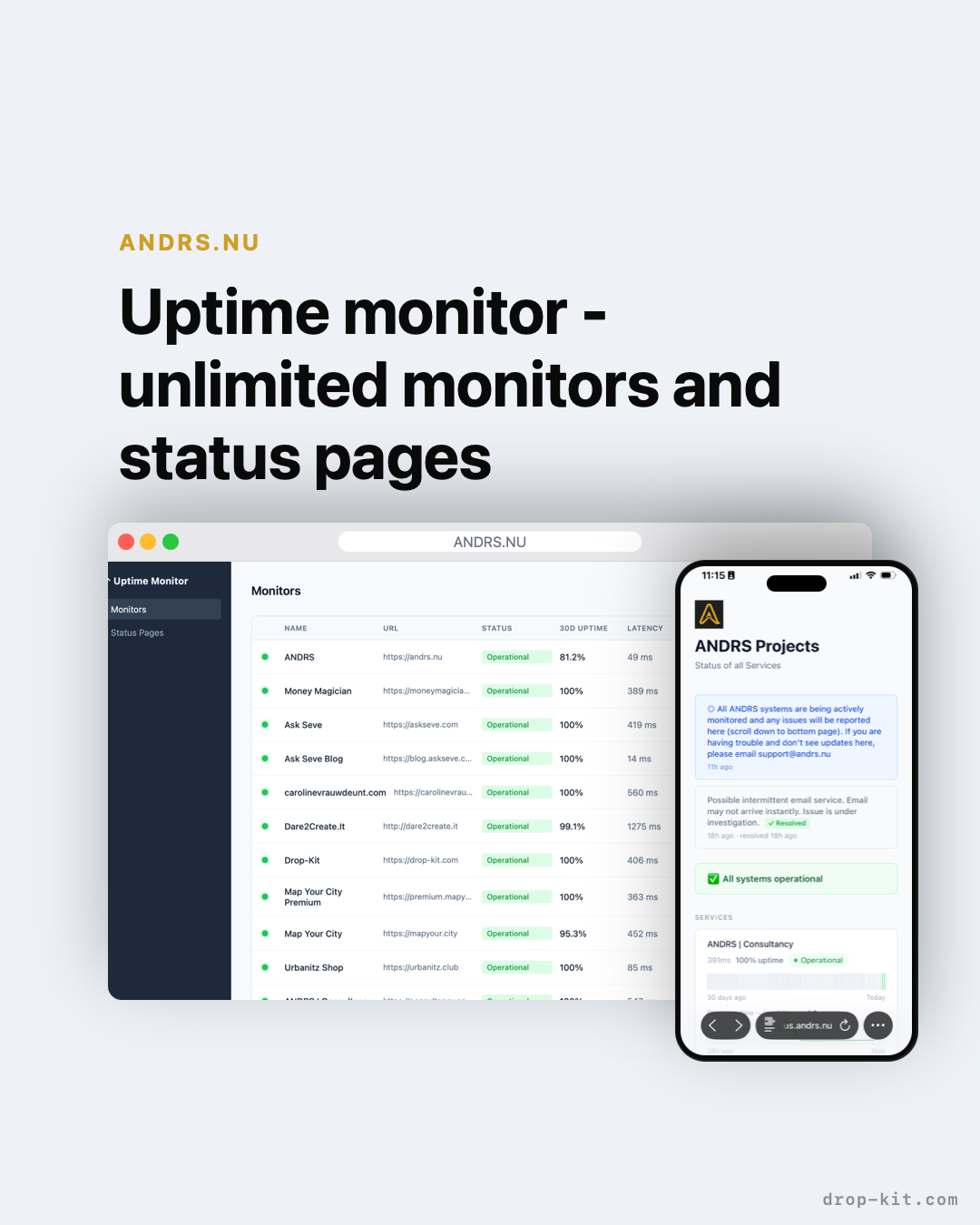
I've been running ANDRS products on Cloudflare for a while now. Workers, Pages, D1 — it's become the backbone of how we deploy things here. So when I wanted uptime monitoring for our own services, the obvious question was: why would I pay for a third-party tool when everything I need is already on the same platform?
That's where Cloudflare Uptime Monitor came from. It's a self-hosted, open-source monitoring setup that runs entirely on Cloudflare's free tier — Workers for the checks, D1 for the data, and a public status page your users can actually see. No vendor lock-in. Your monitoring data stays in your own infrastructure.
In this post, I'll walk through how it works, how to get it running in under 15 minutes, and why I think this is the right default for any team already building on Cloudflare.
The problem with off-the-shelf monitoring
Tools like Uptime Robot and Better Uptime are fine. They work. But they come with a recurring cost, they store your monitoring data on their infrastructure, and they put your status page behind their branding. Every ping, every incident log, every uptime metric — it all lives in someone else's database.
For a small team or a solo founder, that tradeoff is usually fine. But once you're already running on Cloudflare, it starts to feel unnecessary. You have Workers that can run code every minute. You have D1 for serverless SQLite. You have Pages for hosting. Why route monitoring through a third party at all?
The answer is that setting it up from scratch is annoying. You'd need to write the monitor logic, wire up alerting, build a status page, handle incidents. That's a week of work for something that should take an afternoon.
Cloudflare Uptime Monitor is that afternoon.
What it does
At its core, it's a Worker that pings your endpoints on a schedule and records the results in a D1 database. From that data, it generates a public status page showing live health and 30-day uptime history for each service.
On top of that baseline, it includes:
- Slack and Discord alerts — instant webhook notifications when a monitor goes down or recovers
- Incident history — a log of past outages with timestamps and duration
- Maintenance notices — schedule planned downtime so users aren't surprised
- Custom domain support — your status page lives at your domain, not ours
- RSS feeds — users can subscribe to updates
- JSON payload monitoring — check not just that an endpoint responds, but that the response looks right; supports a "degraded" state between operational and down
- Admin dashboard — manage monitors and status pages without touching config files
Everything runs on Cloudflare's free tier. Ten monitors checking every minute uses roughly 450,000 Worker requests per month, well under the 3 million monthly free limit. If you're running 50–100 monitors, you'll want the $5/month Workers Paid plan. Beyond that it scales cleanly.
Getting it running
You need a free Cloudflare account. That's the only requirement.
1. Clone the repo
git clone https://github.com/andrs-tech/cloudflare-uptime
cd cloudflare-uptime
2. Run the setup script
./setup.sh
This is interactive — it walks you through authenticating with Cloudflare, creating the D1 database, deploying the Worker, and setting an admin password. No manual config file editing.
3. Add your monitors
Open the admin dashboard at your Worker URL and add the URLs you want to monitor. You can set the check interval, expected status codes, and whether to validate the response body.
4. Create a status page
In the dashboard, create a status page and choose which monitors to display. Add your logo, set a custom domain if you want one, and share the URL with your users.
That's it. Your monitors are live and checking every minute.
Why I built it on Cloudflare Workers specifically
The architecture choice matters here. A traditional monitoring tool runs on a server somewhere — you're paying for that server, patching it, and hoping it doesn't go down before it notices your service is down. That's a bad design. Your monitoring infrastructure should be independent of your application infrastructure.
Cloudflare Workers run on Cloudflare's global edge network — 300+ locations, no single point of failure. When your origin goes down, the Worker checking it is running in a completely separate system. The status page your users are looking at is also served from that same edge network, not from your servers. So when you're most in trouble, your monitoring and status page are most reliable.
It's also genuinely serverless. There's no instance to manage, no cron server to keep alive. Cloudflare's Cron Triggers fire the Worker on schedule. If a Worker invocation fails, it retries. The data in D1 is replicated across Cloudflare's infrastructure.
Data ownership
This is the part I care about most. Every ping result, every incident record, every uptime metric lives in your own D1 database in your own Cloudflare account. It's never sent to a third-party server. I can't see your monitoring data. Nobody can, unless you choose to make your status page public.
If you want to export everything, you query your own D1 database. If you want to migrate away, you take your data with you. That's how it should work.
Free and open source
The project is MIT licensed. You can find it at cloudflare-uptime.andrs.nu and fork it, modify it, run it however you want. If you add something useful, PRs are welcome.
If you're already on Cloudflare, there's no good reason to pay for a monitoring SaaS. Set this up, point it at your services, and move on.